How to Set Up Two-Way SMS Conversations in GoHighLevel for Lead Conversion
Stop losing leads to slow response times. Learn how to configure and automate two-way SMS conversations in GoHighLevel to close deals faster and engage prospects instantly.

CEO of SkyByte Agency
On this page
If your leads are dying in an unread inbox, you are leaving six figures on the table every year. Most B2B brands and coaches rely too heavily on email, yet text messages boast a staggering 98% open rate. The problem isn't the channel; it's the execution. Knowing how to set up two-way SMS conversations in GoHighLevel is the difference between a stagnant pipeline and a sales engine that books appointments while you sleep. By centralizing your communication, you ensure no prospect ever falls through the cracks again.
Why Your Sales Funnel Needs Two-Way SMS
Speed-to-lead is the single most important metric in modern conversion rate optimization (CRO). Research shows that contacting a lead within 5 minutes increases the chance of conversion by 900%. When you implement two-way SMS conversations in GoHighLevel, you aren't just sending broadcasts; you are creating a fluid, human-centric dialogue that happens on the device your prospects check 160 times a day.
Unlike traditional marketing platforms, GoHighLevel combines the power of a CRM with a unified conversation stream. This means your team can see SMS, email, Facebook Messenger, and Instagram DMs all in one place.
Phase 1: Configuring the Infrastructure for Two-Way SMS
Before you can send your first text, you must build a compliant foundation. Since the industry-wide shift toward A2P 10DLC (10-Digit Long Code) regulations, you cannot simply blast texts without verification. Failure to follow these steps will result in your messages being flagged as spam by carriers.
1. Enable LC Phone System
GoHighLevel’s native telephony service, LC Phone, is the most efficient way to manage messaging. Navigate to Settings > Phone Numbers. If you are still using a third-party Twilio integration, we highly recommend migrating to LC Phone for better deliverability and lower costs.
2. A2P 10DLC Registration
You must register your Business Profile. This includes:
- Brand Registration: Providing your legal business name, EIN, and address.
- Campaign Registration: Explaining to carriers exactly what types of messages you intend to send (e.g., appointment reminders, customer support).
- Opt-in Verification: Showing where users consent to receive texts (e.g., a checkbox on your landing page).
3. Purchasing Your Number
Once registered, buy a local or toll-free number. For two-way conversations, a local number (matching your business's area code) often feels more personal and trustworthy to the recipient.
Phase 2: Building the Automation Logic
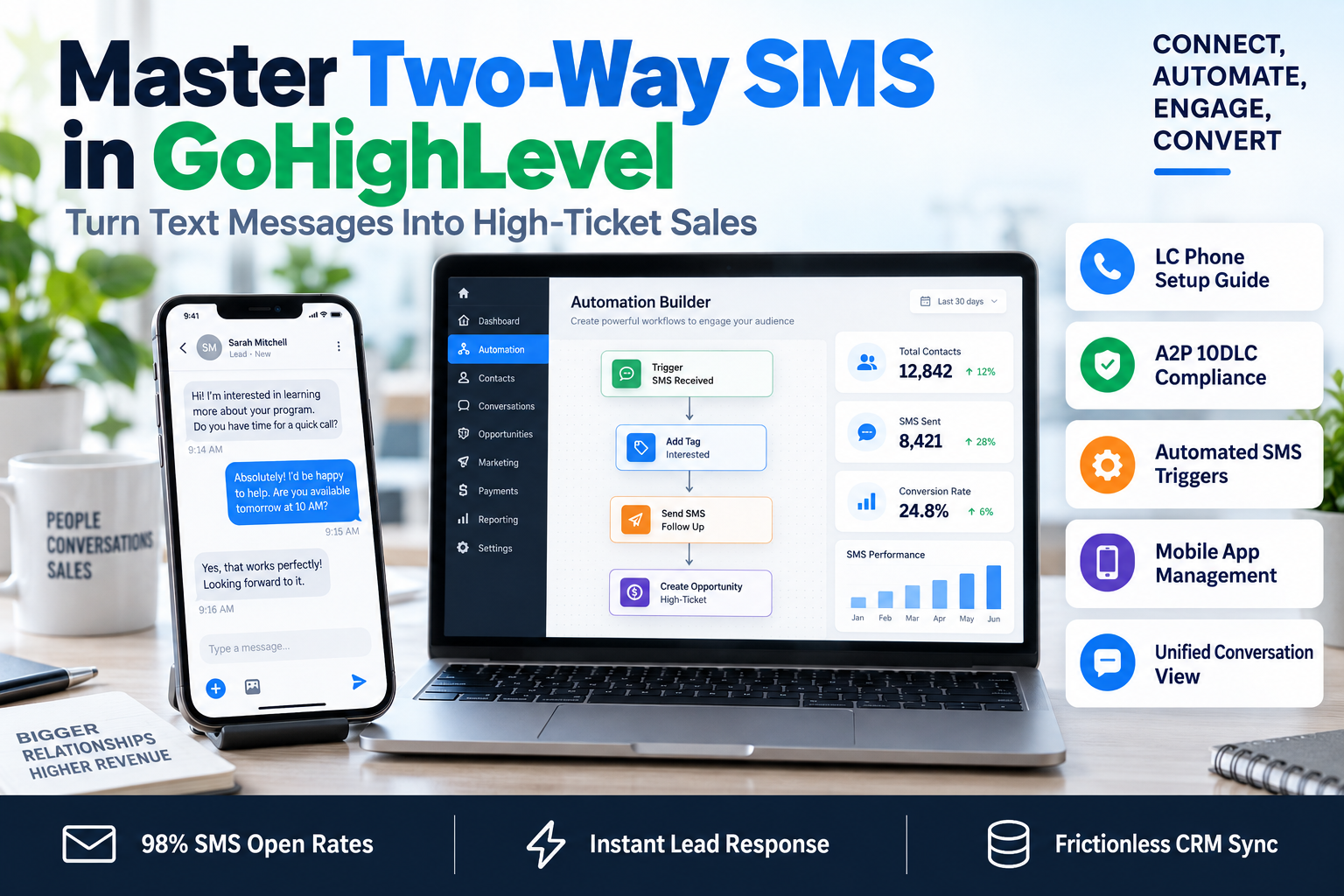
Setting up two-way SMS conversations in GoHighLevel isn't just about manual replies; it’s about smart automation that handles the heavy lifting. Use the Workflow Builder to trigger messages based on specific user actions.
The 'Instant Contact' Framework
Follow this sequence to maximize engagement:
- Trigger: Form Submitted (on your landing page).
- Action: Internal Notification to sales team.
- Action: Send SMS. "Hi {{contact.first_name}}, this is [Your Name]. I just saw your request—do you have a quick minute to chat?"
- Wait Step: Wait 2 minutes for a reply.
- Conditional Logic: If 'Contact Replied' = Yes, stop automation and notify the owner. If No, proceed to follow-up.
SMS vs. Email Engagement: A Direct Comparison
| Feature | Email Marketing | Two-Way SMS (GHL) |
|---|---|---|
| Open Rate | 20-25% | 98% |
| Response Time | 90+ Minutes | 90 Seconds |
| Conversion Rate | Low/Moderate | High (Real-time) |
| Personalization | High | Ultra-High/Casual |
| Usage | Long-form nurturing | Urgent, direct action |
Phase 3: Managing the Unified Conversation Inbox
Once the technical side is live, your team needs to manage the flow. The 'Conversations' tab in GoHighLevel is your mission control.
- Mobile App Advantage: Ensure your sales reps have the LeadConnector (or white-labeled) app installed. Push notifications allow them to engage in two-way SMS conversations in GoHighLevel even when they are away from their desks.
- Templates (Snippets): Save time by creating 'Text Templates.' These are pre-written responses to frequently asked questions that can be inserted into a chat with two clicks.
- Tagging & Segmenting: Use the SMS interaction to tag leads based on their interest level. A lead who replies "Interested" can be automatically moved to the next stage of your sales pipeline.
Essential Compliance Checklists
To keep your account in good standing and ensure high deliverability, always follow these three rules:
- Mandatory Opt-Out: Always include "Reply STOP to unsubscribe" in your initial message.
- No Forbidden Content: Avoid words related to high-risk industries (CBD, gambling, predatory lending) even if your business is legitimate, as carrier filters are aggressive.
- Human Timing: Use the 'Time Window' feature in Workflows to ensure automated texts aren't sent at 3:00 AM, which leads to high complaint rates.
Frequently Asked Questions
Q: How much does it cost to send SMS in GoHighLevel?
A: If you are using LC Phone, you typically pay a small fraction of a cent per segment (160 characters). It is significantly cheaper than traditional ad spend when you consider the ROI of a closed lead.
Q: Can I use my existing business landline for two-way SMS?
A: Yes, GoHighLevel allows you to initiate a 'Hosted SMS' process to enable texting on an existing landline without affecting your voice service.
Q: What happens if a lead calls the SMS number back?
A: You can configure 'Call Forwarding' within the Phone Number settings to redirect that call to your personal cell phone or office line, ensuring you never miss a touchpoint.
Optimize Your Funnel with SkyByte
Simply having the tools isn't enough; you need a strategy that converts clicks into cash. At SkyByte, we specialize in building high-performance sales funnels and complex GoHighLevel automations that take the guesswork out of growth. Whether you need to fix your problem with deliverability or want a Free Website & Funnel Audit to see where you're losing money, our team is here to scale your operations. Ready to turn your CRM into a revenue-generating machine? Book a discovery call with SkyByte today and let's build your automated future.
Want us to set this up for you?
Our team can build and connect this for you, so it works from day one.
Talk to our teamWritten by
Moin Ahmed · CEO of SkyByte Agency
Moin founded SkyByte Agency in 2020 and leads the team behind 3,000+ websites, funnels and GoHighLevel systems. He writes about turning websites into steady sources of leads for small businesses and agencies.
Connect with Moin on LinkedIn