Automation
How to Automate Google Review Requests After Completing a Job
Stop chasing clients for feedback. Learn the exact technical workflow to automate Google review requests and build an unstoppable 5-star reputation on autopilot.
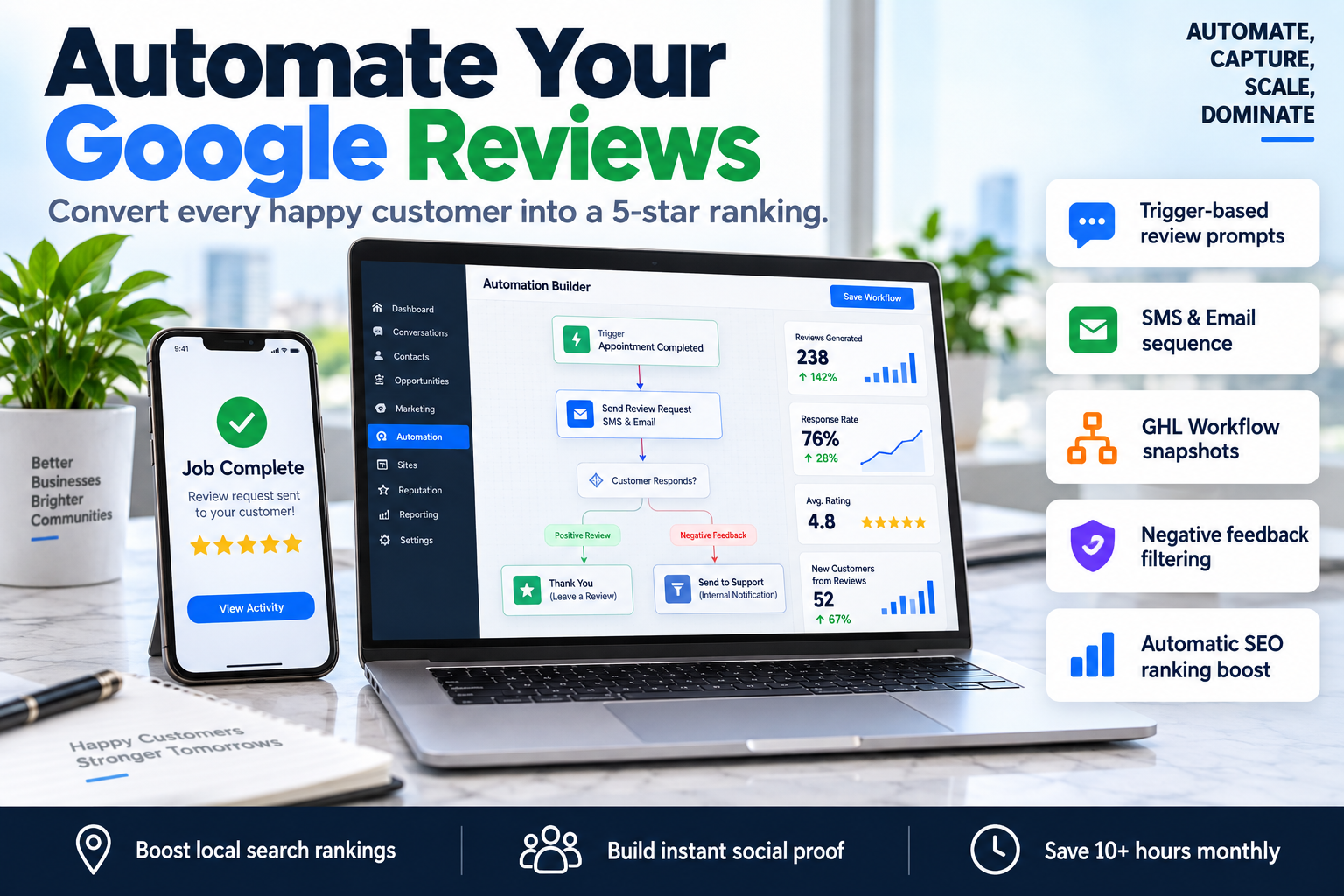
Most service-based businesses suffer from a 'review gap.' You deliver an incredible result, the client is thrilled, you shake hands, and then... silence. By the time you remember to send a manual follow-up three days later, the peak moment of satisfaction has passed. Learning how to automate google review requests is the difference between having 12 reviews and 120. In this guide, we break down the technical architecture required to capture 5-star feedback the second a job is finished.
Why Most Businesses Fail at Reputation Management
Manual review requests are inconsistent. If your team is busy, the request doesn't get sent. If the client doesn't see the email, there is no follow-up. This inconsistency hurts your Local SEO because Google’s algorithm prioritizes 'review recency' and 'velocity.'
When you automate google review requests, you remove human error. You ensure that 100% of your satisfied customers are given a friction-free path to leave feedback while their positive experience is still top-of-mind. This creates a flywheel of social proof that lowers your cost per lead and improves your conversion rates on landing pages.
The Technical Stack for Google Review Automation
To build a truly hands-off system, you need three core components:
- A Trigger Source: Your CRM or POS system marking a job as 'Won' or 'Completed.'
- The Logic Engine: A tool like GoHighLevel (GHL) to process the timing and conditions.
- The Delivery Channel: SMS and Email APIs to send the direct link to your Google Business Profile.
The 'Instant-Feedback' Framework
| Phase | Action | Timing |
|---|---|---|
| Trigger | Update Opportunity Stage to 'Job Completed' | Immediate |
| Verification | Check for 'Internal Rating' (Optional) | +5 Minutes |
| Channel 1 | Send SMS with Direct Review Link | +15 Minutes |
| Channel 2 | Send Follow-up Email if no click detected | +24 Hours |
| Closure | Remove from sequence upon review click | Real-time |
Step-by-Step: How to Automate Google Review Requests in GoHighLevel
GoHighLevel is the gold standard for this process because it combines the CRM and the automation builder in one place. Here is how to set it up:
1. Connect Your Google Business Profile
Before you can send requests, navigate to the Settings > Integrations tab in your GHL sub-account. Authorize your Google account and select the correct GMB (Google My Business) location. This allows the system to generate a unique 'Review Link' that bypasses the need for the customer to search for your business manually.
2. Create the Trigger
Go to 'Automations' and create a new Workflow. Set your trigger to Opportunity Status Changed. Filter this so it only fires when the status is changed to 'Won' or when the 'Stage' is moved to 'Job Complete.' This ensures the request only goes out to people who have actually received your service.
3. Add a 'Wait' Step
Never send the request the exact millisecond the job is closed. It looks robotic. Add a 'Wait' step for 15 to 60 minutes. This gives the customer time to get home, settle in, and appreciate the work you’ve done.
4. Build the SMS and Email Sequence
When you automate google review requests, SMS is your most powerful weapon. Text messages have a 98% open rate.
- SMS Body: "Hi {{contact.first_name}}, it was a pleasure working with you today! Would you mind leaving us a quick review on Google? It helps us out a ton: {{location.review_link}}"
- Email Body: Use a clean, branded template. Include a clear 'Leave a Review' button that leads to the same link.
5. Implement Negative Feedback Filtering (The 'Internal Survey' Method)
If you are worried about a disgruntled client leaving a 1-star review, add an 'Internal Survey' step. Send an initial text asking: "On a scale of 1-10, how happy are you with our service?"
- If they reply 9 or 10, the automation proceeds to send the Google link.
- If they reply below 8, the automation notifies your office manager to call the client and resolve the issue before a public review is ever posted.
Optimizing for Maximum Conversion
Simply sending the link isn't enough. To truly master how to automate google review requests, you must optimize the experience:
- The Direct Link: Ensure you are using the
?shareor/reviewsuffix on your Google link so the review box pops up automatically on their screen. - The Incentive: While you cannot 'buy' reviews, you can tell customers that "Every review enters our monthly drawing for a $50 gift card."
- Personalization: Use custom fields to mention the specific service performed (e.g., "How did your kitchen remodel turn out?").
Frequently Asked Questions
Q: Does automating reviews violate Google's Terms of Service?
A: No. As long as you are not 'review gating' (systematically preventing negative reviews through a technical barrier) or offering direct payment for reviews, automation is a standard and accepted business practice.
Q: What is the best time of day to send a review request?
A: Data suggests between 2:00 PM and 6:00 PM on weekdays, or immediately after service. Avoid late nights or early mornings when users are likely to dismiss notifications.
Q: How many follow-ups should I send?
A: We recommend a 'Two-Touch' system. One SMS/Email on day one, and a single follow-up 3 days later if they haven't clicked the link. Anything more becomes an annoyance.
Work with SkyByte to Scale Your Reputation
Building an automated reputation engine is just one piece of the puzzle. To dominate your local market, you need a high-converting sales funnel and robust GoHighLevel automations that handle the entire customer journey from lead to 5-star review. At SkyByte, we specialize in building these systems for coaches, consultants, and B2B brands who are tired of manual follow-ups.
If you're ready to stop leaving your reputation to chance and want to build a machine that generates leads and social proof on autopilot, we can help. Book a discovery call with SkyByte today to see how we can transform your CRM into a conversion powerhouse. You can also get a free funnel audit to identify the leaks in your current process or fix your problem by delegating your technical debt to our expert team.