Automation
How to Set Up SMS Automations for Leads in GoHighLevel to Boost ROI
Stop losing leads to slow response times. Master the technical setup of SMS automations in GoHighLevel to trigger instant, high-converting follow-ups that turn cold traffic into booked calls.
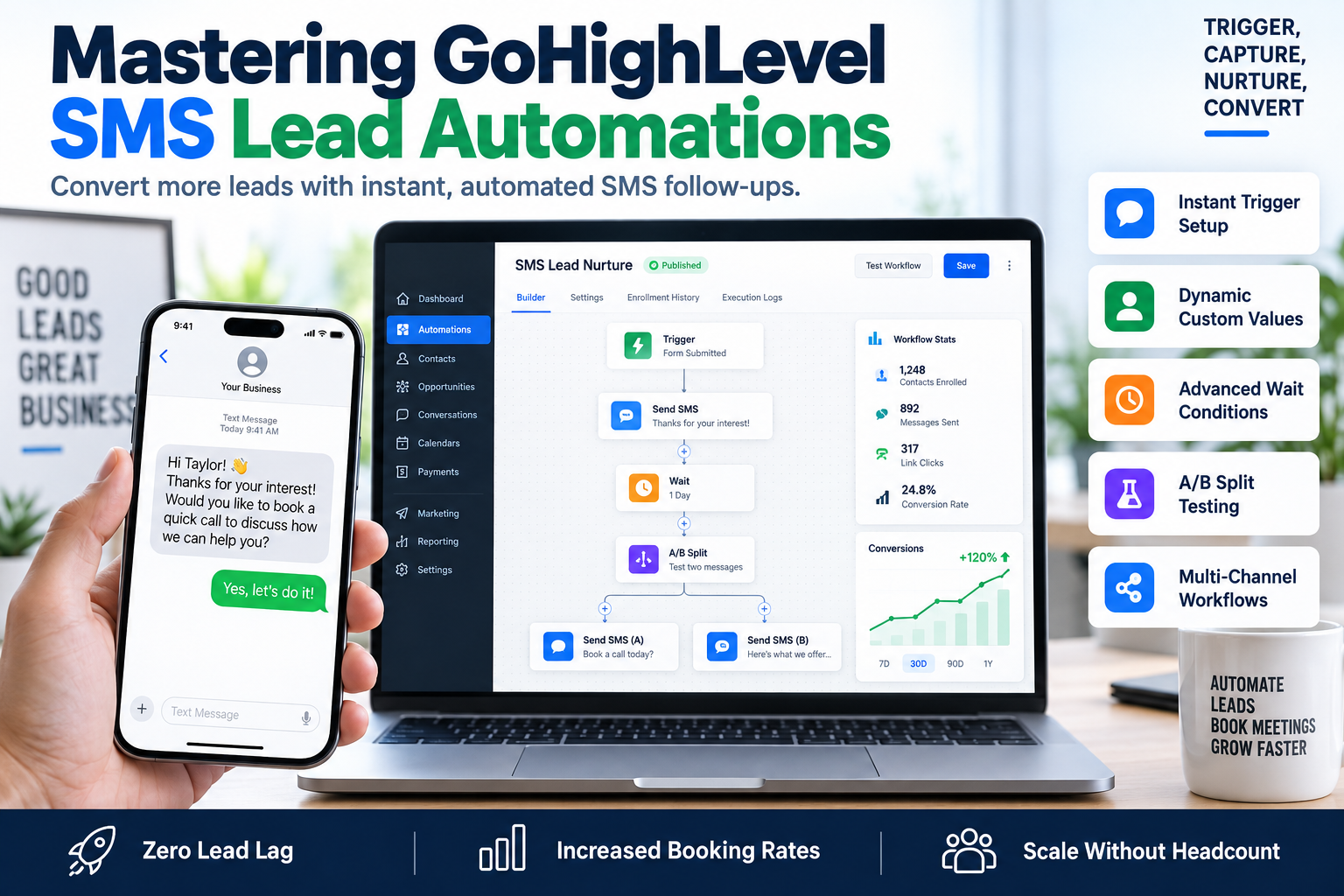
Speed to lead is no longer a competitive advantage; it is a requirement for survival. In the current B2B and coaching landscape, waiting sixty minutes to contact a prospect decreases your odds of qualifying that lead by 400%. If you aren't using SMS automations for leads in GoHighLevel, you are effectively throwing your ad spend into a black hole. High-intent prospects expect immediate gratification, and a text message has an open rate of nearly 98%, far outpacing traditional email marketing.
Setting up automated text sequences allows you to bridge the gap between a lead clicking 'Submit' on your landing page and your sales team actually getting them on the phone. This guide breaks down the technical framework for building high-conversion GHL workflows that drive discovery calls on autopilot.
The Technical Framework for SMS Automations for Leads in GoHighLevel
Before you drag a single node into the GoHighLevel workflow builder, you must ensure your infrastructure is compliant and functional. Without the right foundations, your messages will be flagged as spam or fail to deliver entirely.
- A2P 10DLC Compliance: You cannot skip this. Ensure your Brand and Campaign registrations are approved within the GHL Trust Center. Unregistered traffic is increasingly blocked by major carriers.
- Phone Number Acquisition: Provision a local or toll-free number within your sub-account settings.
- Lead Source Integration: Ensure your triggers are mapped to specific forms, surveys, or Facebook Lead Ads.
Step-by-Step: Creating Your First Lead Nurture Workflow
To effectively set up SMS automations for leads in GoHighLevel, you need to think in terms of triggers and actions. Here is the standard architecture SkyByte uses for high-ticket coaching funnels:
Step 1: Define the Trigger
Navigate to Automations > Workflows and create a new workflow from scratch. Your trigger is the entry point. Common triggers include:
- Form Submitted: Ideal for landing page opt-ins.
- Survey Submitted: Best for pre-qualifying leads before the text goes out.
- Facebook Lead Form Submitted: For direct API integration with Meta ads.
Step 2: Add Internal Notifications
Before the lead gets a text, your team needs to know they exist. Add an 'Internal Notification' action. Send a mobile app notification or an internal SMS to the assigned user with the lead's name and phone number.
Step 3: The Initial SMS Blast
This is the most critical step in your SMS automations for leads in GoHighLevel setup. The first message should be sent with zero delay. Use 'Custom Values' to personalize the message:
- "Hey {{contact.first_name}}, this is [Name] from SkyByte. I saw you just requested our funnel audit—do you have 2 minutes to chat about your current conversion rate?"
Comparison: SMS vs. Email Engagement in GHL
| Metric | Email Automation | SMS Automation (GHL) |
|---|---|---|
| Open Rate | 20-25% | 98% |
| Response Time | 90+ Minutes | < 90 Seconds |
| Click-Through Rate | 2-3% | 19-25% |
| Consumer Preference | Professional/Low Urgency | Personal/High Urgency |
Advanced Strategies for SMS Automations for Leads in GoHighLevel
Simply sending one text isn't enough. To maximize your sales funnels, you need to implement logic-based sequences.
Implementing 'Wait' Conditions
Don't overwhelm the lead. If they don't respond to the first text, add a 'Wait' step for 24 hours. However, use the 'Time Window' feature to ensure you aren't texting prospects at 3:00 AM. GHL allows you to restrict automation execution to specific business hours.
Using 'If/Else' Logic for Personalization
If you use a survey to qualify leads, use an If/Else branch. If the lead reports a budget over $5,000, send them a link to book a call immediately. If the budget is lower, send them to a long-form VSL or a lower-tier resource. This ensures your SMS automations for leads in GoHighLevel are serving the right content to the right person.
The 'Contact Replied' Trigger
Create a separate workflow for when a lead replies to your automated SMS. This should immediately stop the nurture sequence (using the 'Allow Passage' or 'Stop on Response' settings) and notify a human sales rep to take over the conversation manually. Automation gets the lead to the door; human interaction closes the deal.
Compliance and Best Practices
When you set up SMS automations for leads in GoHighLevel, you must adhere to TCPA regulations to avoid heavy fines:
- Include Opt-out Language: Always include "Reply STOP to unsubscribe" in your first message.
- Clear Value Proposition: Tell them exactly who you are and why you are messaging.
- Frequency Caps: Do not message more than 2-3 times in the first 48 hours unless they reply.
FAQ: GoHighLevel SMS Automation
Why are my GHL text messages not sending?
Most failures are due to A2P 10DLC registration issues or lack of wallet balance in your Twilio/LC Phone settings. Check the 'Execution Log' in your workflow to see the specific error code.
Can I send images via SMS in GoHighLevel?
Yes, you can use MMS by attaching a file to the SMS action node. This is highly effective for sending QR codes, social proof screenshots, or personalized 'Welcome' cards to increase engagement.
How do I stop the automation if the lead books a call?
Use a 'Workflow Trigger' for 'Appointment Status' (Confirmed). In the settings of your lead nurture workflow, you can set it to remove the contact from the workflow once they meet the goal of booking an appointment.
Scale Your Revenue with SkyByte
Setting up SMS automations for leads in GoHighLevel is the difference between a funnel that leaks money and one that prints it. But building complex, logic-gated workflows requires a deep understanding of both the software and the psychology of conversion. If your current lead follow-up is slow, inconsistent, or non-existent, it's time to upgrade your infrastructure.
At SkyByte, we specialize in building high-performance sales funnels and GoHighLevel architectures for B2B brands and consultants. We don't just build pages; we build automated ecosystems that capture, qualify, and convert leads while you sleep.
Book a discovery call with SkyByte today to see how we can optimize your GHL setup, or request a free funnel audit to identify the gaps in your current automation strategy. Let's fix your problem and start scaling your conversion rates today.